Showing posts with label tricks. Show all posts
Showing posts with label tricks. Show all posts
Saturday, December 24, 2016
How to get Whatsapp free for 10 years.

How to get Whats app free for 10 years.
As we Know that over 20 million people registered on whats app and the growth is increasing day by day with the passage of time.Whats app is one of the most popular messenger in the world because of its key features and reliability. But the main problem is that how to get whats app premium for free.So here is the trick for you to get free whats app for 10 years.
Gadgets you needed :
A. Iphone / Ipad
B. Your own Android phone
Also Read:How to get verify your payza account for all countries.
How to extend your whatsapp membership:
1. Register your Android WhatsApp phone number on WhatsApp for iPhone (doesn't need to change the sim card, just register the number only).
2. Enter 3 digit SMS code sent to your sim card and enter it on WhatsApp for iPhone.
3. Re install whatsapp for Android, then register your number that already registered in iPhone and you will get 10 years license.
Feel free to share your experience thank you!

Thursday, December 8, 2016
How to Speed up USB drive data transfer speed

How to Speed up USB drive data transfer
The most useful and important device for all computer users is their Pendrive/USB/flash. Most of us face one common problem that is when you buy a new Pendrive it works Fast but with passage of time, data transfer rate starts decreasing. As you all know data transfer rate depends on types of files you are transferring like songs, docs, videos may get transferred very quickly and also depends on locations of Files. If you want to transfer a bunch of files to same drive but another folder then transferred very Fast. But if you want to transfer files from one drive to another then it will take some time same likewise in Pendrive. As you all know about USB Port Version 2.0 which is most popular and the computers which manufactured after year 2000 have 2.0 USB port Version. The main advantage of this version is give you the Speed of 35mbps (Theortically).
Now come to the main point how to Speed up USB drive data transfer and for this you will need to change the File System to NTFS of your pendrive and also change the device policy in order to speedup your Pendrive. You just need to follow below Steps to Speed up your USB drive data transfer.
1. Plugin your Pendrive then Right click on pendrive and select Format and after this you will loose all your data of pendrive so better 1st take a backup) now select NTFS File system, Uncheck quick format and click on start.

Note: Changing the File system to NTFS because FAT 32 can't handle large amount of data
2. After formating Pendrive and Converting it to NTFS file System, now change the device policy and for this again goto Pendrive Properties and click on hardware Tab then select your USB device from the list and click on Properties.

After clicking on properties you will see a new Dialog Box, so now click on change settings, then another Dialog Box will appear, now click on Policy Tab and select better performance, Click ok .
That's it.
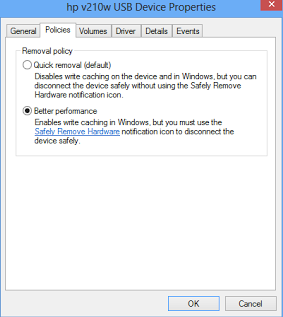
Note: I will recommend to restart your system. Now you will notice Data Transfer Speed Will Increase but 1st make sure you click on ”Safely Remove Hardware and Eject Media” before removing your Pendrive.
Wednesday, November 30, 2016
How to Register Free UK Number With Free International Divert

How to Register Free UK Number With Free International Divert
Recommended:Receive SMS Online on USA,UK,Norway,Sweden Numbers
Features:
- Free fax to email
- Free IVR
- Live call records
- Ability to earn Free UK Minutes
- Quick and efficient Service
- Ability to use unlimited numbers
- Addition and deletion of number
- Routed over 20,000,000 calls
- Main site running 23 data centers
- Service is operational 24/7
- Free International Call Forwarding
How to register free UK number
After knowing its amazing features surely, you will want to know how to register UK number.By registering UK number you can conduct your own business without worrying to give your International phone number.Now, let's move to know how to register free UK number.Below are free and easy steps.
Steps:
1). Go to this LINK.
2). Enter your first name, Last name and Email address.
3). Click on "Register". That's all you have registered your Free UK number.

4). When you click on Register, your tab will redirect to a new tab at which you will find lists of UK numbers as shown in below image.
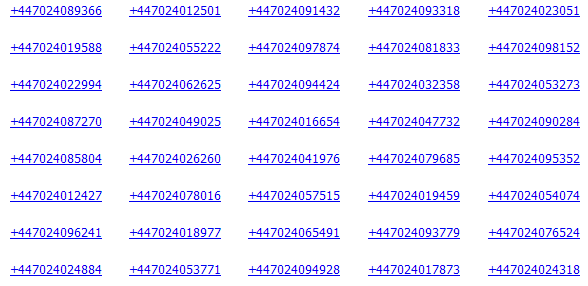
5). Click any number which you like.You will redirect to a new page which ask you to redirect to divert UK number which you choose to mobile or land line number.For example if i choose number
like +447024089366 then I get options to divert it.
like +447024089366 then I get options to divert it.
How to divert UK number to Mobile or Land line:
When you have registered UK number,next step is to divert you UK number to mobile.Here are some rules which you have to follow for number.Number which you want to divert must be in E.164 Format.
Do not enter + symbol before number.
Enter country code along with number for divert as like below.

6). In this step you have to do below operation.
- Enter you own UK number
- Enter number on which you divert call.( Destination number)
- In Caller ID section enter number who one can call you.
- Select any ring tone which you like.
7). If you are satisfy all information which you have enter click on Activate Route.That's all you have done.If you have any query while registration then move to HELP.
Final words:
This tutorial is very beneficial regarding free registration of UK number.If you do not want to share your personal number then this will help you.Multiple features like call forwarding,voice call,fax etc you can avail freely.So, move to register your UK number as have explained in this tutorial.If you have any problem you may ask our site team or mention in comments.
Tuesday, November 22, 2016
iReff – A Useful App to Know Mobile Recharge Plans / Offers in India

iReff App to Know Mobile Recharge Plans
Android is most latest and popular operating system for smartphones.it has many apps like
1. Call and SMS Blocking Apps
2. Cooking and Recipes Apps
3.Sports apps for Android
4. Android Photography Apps
All these apps are used for specific purpose and has amazing features.Same like them.there is a iReff android app is also designed for a special purpose with amazing features.iReff app helps you to know the complete details of your mobile recharge. You can get the details of a particular Recharge Plan/Offer just by sending an SMS via your phone.This app provide simple and friendly interface to use.After launching this app just you need to select your mobile operator and your circle. In short time , you will be able to see a list of recharge Plans / Offers available for you. A screenshot is shown below;

Features:
- iReff has some amazing features which are given below.
- supports 14 prepaid mobile
- Support 22 telecom circles
- User can freely change the mobile operator and the circle..
- Different Recharge plans
- Topup plans/offers as SMS, 2G/Data, 3G,STD
- Updates the Recharge Plans/Offers daily
- Updates BSNL Recharge Plans/Offers every 1-2 weeks.
- Provides information about particular recharge Like Talktime
- Dedicated search to search recharge plans
Updated on: September 19, 2013
App Size: 925k
Price: Free
Current Version: 0.9.18
Requires Android: 2.1 and up
To use iReff using SMS facilities, go to official website.
Monday, November 21, 2016
Reliance New 3G Trick With VPN Config - November And December 2013 Direct Download Link

Reliance New 3G Trick With VPN Config
November And December 2013 Direct Download Link
Reliance Mobile is one of the leading CDMA & GSM Service providers in India. After Posting Airtel, Vodafone and BSNL New VPN Configs, Now we going to post new Reliance 3G VPN Trick. So Enjoy............
Features Of This Reliance Trick :
- Reliance Not Connect In 0 Balance. Just Recharge A Small 3G Pack And Connect.
- APN - rcomnet
- Based on Reliance 3G VPN Configs
- No SIM blocking in this trick
- No speed capping
- All Website Accessible
- Torrents Supported
Download This Trick :
NMD VPN: DOWNLOAD
Download Configs With Details Of Reliance VPN Trick: DOWNLOAD
Saturday, November 19, 2016
How To Setup And Connect With PD-Proxy And Use Free Internet

How To Setup And Connect With PD-Proxy And Use Free Internet
VPN is a service which helps to hide your IP address. As we all know every system/device which connected to internet has a different IP address and with help of them any site or third party user can see your location and can control your freedom on internet like ISP are blocking sites and pages in these days. So, you can use PD-Proxy to hack any operators by some proxy and ports to use free internet but how see below method :P
Why PD Proxy ?
You all have question Why PD Proxy? As Pd Proxy is a vpn service and the best part this service is you can scan open ports form this and Pd proxy comes with a software that is special designed for it, so there is no need to have any additional tech knowledge to use pd proxy but the main problem is that there is a bandwidth limit on their trial accounts so if you wanted unlimited usage then you have to buy a premium account. But below sharing trick to use trial account unlimited.
How To Setup PD-Proxy With Settings :
1. Download Pd proxy From HERE
2. Create A Trial Account From HERE
3. Now Run PD-Proxy As Administrator And Install Tap Drivers

4. If You Have Any TCP Port - Then Fill It In TCP Server Port Box

5. If You Have Any UDP Port - Then Fill It In UDP Server Port Box

6. If You Have Any Bind Local Port - Then Fill It In Bind Local Port Box

7. Now Goto Parent Proxy And Check Enable Parent Proxy And Fill IP And Port If You Have Any

8. Click On Headers And Fill A Headers If You Have Any

9. Then - Save & Go back - And Connect It With Your Account.
Thursday, November 17, 2016
Vodafone 3G New VPN Trick 2014 || Vodafone 3G New VPN Trick Direct Download Link

Vodafone 3G New VPN Trick 2014 || Vodafone 3G New VPN Trick Direct Download Link
World's most famous and awesome British multinational telecommunications company is Vodafone. This company famous in whole globe but in India its emerge very fastly so after getting 3G tricks on Airtel and BSNL all friends request to upload Vodafone 3G Free Internet Trick. So, Now its time to become happy for all Vodafone users because Here in this Post have provide you the Vodafone 3G New VPN Trick 2014. Its all about Vodafone VPN Trick. So now Direct Download Vodafone 3G New VPN Trick 2014 from below Link.
Features Of This Trick :
- Based on TCP Open Port
- No Balance Deduction at All
- Supports Torrent
- Works In Android Smartphones Via Feat VPN
- Unlimited Usage with No Limitations
- No SIM Blocking Issue in Vodafone
- Tweaked with default Vodafone APN
- No Speed Capping
- Works in 2G and 3G mode
Download This Trick :
NMD VPN - DOWNLOAD
Download Configs Of Vodafone New VPN Trick - DOWNLOAD
Saturday, November 12, 2016
BSNL Free 3G PD-Proxy Trick Works 100% 2014

BSNL Free 3G PD-Proxy Trick Works 100% 2014
BSNL(Bharat Sanchar Nigam Limited) is an Indian state-owned telecommunications company. It offers best telecom & network services so after getting lot of people's request here in this article is all about New BSNL 3G Trick 2014. Its very simple and easy 3G Hack Trick. For this trick you need PD-Proxy and you can also Download this Trick directly. I am sure BSNL Free 3G PD-Proxy Trick 100% work for you. So, this Trick working in all over India Enjoy with BSNL Free 3G PD-Proxy Trick.
Features Of This Trick:
- Works In All States
- Torrent Supported
- Works In Old And New Sim
- Based On UDP Ports
- Highest Transfer Rate 400Kbps
- No Speed Capping Problems
- Works On Rs1 Bal or More
Download Trick Links:
PD-Proxy: DOWNLOAD
PD-Proxy Sing Up From: HERE
BSNL New 3G Working Trick: DOWNLOAD
Friday, November 11, 2016
AIRTEL 3G NEW 2014 Trick - Based On Free VPN Configs

AIRTEL 3G NEW 2014 Trick || Based On Free VPN Configs Without Survey
Airtel is an Indian multinational telecommunications services company which is best and the most popular all our country. The new Airtel 3G trick is working most of states so you can also try it in your state. This is an TCP based VPN trick. First this trick post with survey on 1st November and now this trick post without survey
Features Of Trick :
- Easy to use
- Works with zero balance.
- Torrent supported
- No speed capping issue
- Works with default APN : airtelgprs.com
- Resume support downloading
- No Sim Blocking.
Download Trick :
NMD VPN: DOWNLOAD
Airtel 3G New TCP VPN Trick With Details: DOWNLOAD
Friday, October 14, 2016
How to get Unlimited Coins in Subway Surfer?

How to get Unlimited Coins in Subway Surfer?
Subway Surfers is an "endless running" mobile game which is co-developed by Kiloo and SYBO Games. Kiloo is a private company which based in Denmark. Subway Surfers was launched in 2012 and "World Tour" is the theme of this game, main cities are the capital or most populous of the world like New York, Sydney, Rome, Rio de Janeiro, Tokyo, Miami, Moscow Beijing and Paris. This games is available on the iOS and Android platforms. The basic three default characters of the game are Jake, Tricky and Fresh and they dash and dodge trains to escape from the grumpy inspector and his dog. To gain coins is the basic goal of this game and everyone want to gain more coins because coins are use to purchase characters, upgrades, boards, single use items and much more. To gain more coins the games offers two options:
Free Coins
Paid Coins
But you can get unlimited free coins without paying single penny you just need to follow below steps:
How to get Unlimited Coins in Subway Surfer?
Step 1: First download Subway Surfers for PC.
Step 2: Now download Cheat Engine which will help you to get unlimited coins.
Step 3: Now its time to start game and after taking 10 to 20 coins then pause the game.
Step 4: Now open cheat engine and there you will see a shining computer icon and that's the processing opening button.Click on icon and choose subway surfers from the menu then press open.
Step 5: After this process your game will be loaded and now its time to enter the exact coins value in value field which can see in first scan and next scan button. Properly make sure the scan type is "Exact Value" and value type is "4 Bytes" then press first scan option.
Step 6: After it scan is start it might be slow your system but mainly depending on your system Speed.
Step 7: Now you need to the narrow search after it resume your game and play for few more coins till you gain till 30 to 40. Again press pause button and once again search the new value but now press Next Scan with new number.
Step 8: That's all now you will get 1-2 address, so repeat this process till you get one single address and then just double that address.
Step 9: Now your address will get loaded below then just double click on Value and change the value to whatever you want your coins to be like 9999999 that's all and now press OK.
Step 10: Again start your game and in 1-2 seconds you will see your new coins updated :)
Thursday, October 13, 2016
How To Download Facebook Videos Without Using Any Software

How To Download Facebook Videos Without Using Any Software
Facebook is one of the best and most powerful social media and every internet user know this most famous social networking website for sharing status updates, images/photos, Videos and many more with their friends. Everyday we share lot of images and videos and also see on home page we can easily save our favorite images but if we like any video then we have trouble to download it. You have seen and tried lot of tricks to download Facebook but they not work properly and your desired video is not downloaded or you try different software to download Facebook videos. But now you don't need to worry anymore because here in this article have mentioned best trick to download facebook videos without any software. You just need to follow below step by step procedure to download Facebook videos.
Step By Step Method To Download Facebook Videos:
Step 1: Open your desired video which you want to download and then right click on the date to get video URL as shown in below screenshot.

Step 2: After copying URL for example below PC URL
Like: https://www.facebook.com/photo.php?v=494416397318443
Step 3: Now you have to convert PC URL into Mobile URL just by adding "m" in front of URL. LIKE: https://m.facebook.com/photo.php?v=494416397318443
Step 4: Now Open the video in Mobile format it will look like below.

Step 5: Now right click on the video and choose save video as option to download video like below screenshot.

Note: First play video then right click and choose "save video as option".
If you like this simple trick How To Download Facebook Videos Without Using Any Software then don't forget to like and share with your friends Thanks.
Tuesday, October 4, 2016
How to Impress a Girl on Facebook || Tips and Tricks

How to Impress a Girl on Facebook
Facebook is one of the biggest social media which connect many people and it also cause of many relationships so with all dating tips and way to to date online now if you have a girl on facebook than you must thinks how to impress her. If you really searching for real tips and tricks on how to impress a girl on Facebook? Then now you are at right place because here in this article you will find the best tips and tricks to impress girl on facebook. you can also apply these tips and tricks on other sites to impress any girl online.
Many times you thinks and question to yourself how to impress girls on FB??
When ever you added a girl then you are interested the idea of how to impress a girl and this idea automatically comes to your mind but at the same time, you also deal with the fear that the slightest mistake will make the whole thing wrong. So if you want to impress girls on Facebook, then keep in mind it’s not only about the conversation you have with her which is going to determine how successful you are, but also every little detail on your Facebook profile. Now you have to focus below mentioned Tips which will really helpful for you
1. Make Facebook Profile attractive
It is one of the most important tip to impress girl because if you really want to impress girls then make sure your profile is girls-friendly. Now you are thinking what is meant by girls-friendly its mean avoid swearing and being disrespectful on your wall and also ragging about your sexual experience or fantasies openly on your wall with friends and if you are so eager about having such types of conversation,do it on a private chat. You should also posts such pics which impress girls like moral quotes, love quotes etc.
2. Choose Very Attractive Profile Picture
Everyone want best DP for their profile and there are lot of collection for DPs but selection must b unique if you want to impress girl. Many times most of people just impress by your profile picture and DP is your 1st impression so now you know power of profile pictures. DP can tell millions of stories on what kind of person you are and if you want to impress a girl, only add those pictures which are going to create the right kind of impression like make use of pictures which depict you in different kinds of setting-school, work, at home playing with your pets, hanging out with friends and families. You can also make your DP attractive by using online photo editing tools.
3. Avoid This
You should avoid uploading pictures of you and your sexy ex or the boozer picture which you want her to know you know the definition of fun. You should also avoid to upload your drunkard photos it also gives bad impression and party animal spirit you can show it all after sometime but not in start.
4. Words, Compliments and Interests
As your walls and profile pictures have given her a preview of your personality, it’s about time you show her the real you. You should start the conversation like you are normal person slowly take things to the next level by complimenting her profile pictures-this will show her that you took the time to have a look at her pictures and you are genuinely interested in her. Now the trick here is be specific and stand out from the bunch of guys who keep throwing compliments at her. So, you should avoid saying things like, you look beautiful on your pictures-be specific and say things like ‘I loved picture where you were holding your pet, you looked cute and full of innocence!
5. Confidence, Patience and Common Sense
If you want to impress a girl then you must learn to be confident about your dating and flirting skills. Because girls don't like such guys who are not confident so you must be confident and know how to lead a conversation and relationship. Impressing any girl is a step by step procedure which requires time, so you should learn to be patient and play your moves right in order to impress her. Finally, you should using some common sense which is important while trying to impress a girl.
You may read thousands of dating tips and advice but always remember not all of them work with everyone. Also, you need to learn when to back off from a girl, if she continuously ignores your mail, messages, does not pay attention to any of your action in a bid to impress her then do not hold on to her, Its clear she is not interested in you so try another :P
And most important dating and flirting skills come with practice, so keep practicing :)
Sunday, September 25, 2016
How to Convert 2GB Memory Card to 4GB

How to Convert 2GB Memory Card to 4GB
Storage become one of the great problem nowadays because of to much data. Everything become digital like our important documents, books and many more so now people need more storage space for their uses devices but how to increase their existing space this can be solved with the help of Memory Card but what we do if our data increasing day by day? Have we bought new Memory Card everyday? Is such a difficult thing. So what a best way in this way? Isn't we increase our Memory Storage?
Yes! Now you can easily increase your Memory Card Storage Space with the help of below mentioned method. This method works mostly on all SDcards or memory cards. If you have 1 or 2 GB card then you have to try to increase internal space of your memory card or SDcard. Most of you maybe thinking that it is impossible and this is just joke, but i make you sure its not joke. Below method really works and there is a script that makes your Memory card internal space to 4 GB. This is such a awesome trick and it is tested by many users, you just run a script, enter your Memory Card's Name, its letter (commonly it is 'E' but you may have 'A', 'S' or whatever you want). This trick is very helpful and important for those who have 1 GB or 2 GB cards and they cannot buy 4 GB cards for some reasons. Now You will come to know how to increase internal size of your SDCARD/Memory Card. Most important it works only on some memory cards and specially on 1 GB or 2 GB internal storage cards and if you will try to increase your android's internal memory by below method then you can brick your Android's Internal Card or Memory Card which may next time never work. So, please try only on your SDcards and memory cards.
What you need?
- 1 GB or 2 GB Memory/SD card
- Increase Internal Space of Memory Card Toolkit
How to convert 1 or 2 GB Memory/SD card to 4GB?
1. First i recommend you to take a backup of Your Memory Card and its not a big deal :)
2. Extract 'increase internal space of memory Card Toolkit' which you have downloaded.
3. Now insert your 1 GB or 2 GB Memory Card/SD card in your computer but 1st take backup.
4. After taking complete backed up of your Card then open Drive Increaser.bat file from extracted folder.


5. After the script will open, it will ask you for name which you want to give your SD/Memory Card. like me entered 'Sama' and after entering name, hit enter.
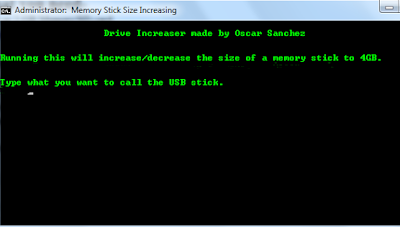

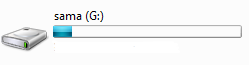
6. Now, you have to enter your Drive's letter and if you don't know your Memory Card/SD card's letter, then goto My Computer. Here you will see your C drive along with many drives and you will also find your Memory Card/SD card's, So see its letter, for example because it very important to be careful while entering your drive name. Like My drive's name is G:
 7. Now, again enter your drive name. Once again be careful while entering drive name.

8. Now, wait............because the script will do the rest of work it self. You will not wait more because it mostly complete its work within 2-10 minutes or maybe more.
9. when its done then see your Memory Card/SD card internal space and if it is 4 GB then you have good luck :) and in the same way if your Memory Card/SD card's internal storage have not increased then you are having bad luck :(
If it increased then now, you have converted your Memory Card/SD card's internal storage and now you can restore the backup that you have taken.
So now you can store files upto 3 GB (4 GB does not means full 4GB, even 8 GB pen drives or memory cards have space upto 7 GB+). If you have good Luck mean have increased space then i am sure you are so happy and if you are happy then Please share with your friends they also Convert 2GB Memory Card to 4GB. And if you face any problem or suggestion then can write in comment box Thanks :)
Monday, August 29, 2016
How to Find Friend's IP Address from Facebook?

How to Find Friend's IP Address from Facebook?
Facebook great Social media and one of the most popular way to communicate with all over the world. We can't deny its popularity but we also have some privacy issues with it. As we can't identify any person from name or profile because people have a lot of fake Ids which are difficult to find. But now no need to worry about any more because here in this post you will find a best method to identify a person not just because of their name but their IP address which is unique and one of the best way to catches any one, So now no one can make you fool if you have bit skills. As getting IP Address from Facebook Chat is not easy. Now you need to focus on main point because in this method you'll host PHP script on a free web hosting site then send the link and retrieve the IP Address.
Step 1: Creating PHP File
1. Create a new text document and edit it
2. Write the following PHP code inside it:
<?php
$ip = $_SERVER['REMOTE_ADDR'];
$dt = date("l dS \of F Y h:i:s A");
$file=fopen("ip_log.txt","a");
$data = $ip.' '.$dt."\n";
fwrite($file, $data);
fclose($file);
header( 'Location: http://www..com') ;
?>
3. Replace ".com" with any other link
4. Save that as : anything.php (e.g: ip.php)
Step 2: Webhosting
Now from any Free web hosting service you can Sign Up1. Go to x10hosting
2. Signup for an account ( choose a right domain name e.g : .x10.mx )
3. After creating an account on x10hosting, go to the File Manager and open the public_html directory
4. Click Upload, and select the PHP file that you created on Step 1.4 (ip.php)5. Select all permissions from Read/Write/Execute (777)
Step 3: Get IP Address
After setting up an account and uploading the .PHP File, Now it's time to get IP Address of any Friend on Facebook which is your main purpose
1. Go to the domain that you created in Step2.2(example .x10.mx)
2. You'll see the PHP file that you created, right click>Copy Address Link
3. The link will be something like this : yourdomain.x10.mx/anything.php. In above example it will be: .x10.mx/ip.php
4. Send that link to any of your friends, after he/she clicks on the link, he/she will be redirected to the link that you replaced in step1.3 (in my example: .com)
5. Go to your domain name again like step1 (e.g: .x10.mx)6. You'll see a new text document named ip_log.txt
7. Click that file, you'll get all IP Addresses of your friends that accessed that link.
Done! Now you can track Your Friends IP Location using IP Tracer,
Alternative Method:
If you are unable to all the methods which we listed above and still want to find ip address of friend whom you chatting, Hay ! don't lose hope we are here to help you we have performed all the steps listed above for you and made a link you have to just sent this to your friend and ask him to check it. then you Done :) after that check from link 2 the ip will be listed at end.

Link to send to friend:
http://adf.ly/5724890/http://brilliantshare.com/test/earnmoney.phpLink to Check Ip adress
http://adf.ly/5724890/http://brilliantshare.com/test/ip_log.txt
As daily number of peoples use this way to check ip so most recent will be yours. Please stay connected with us Subscribe us with mail to get all this type of tricks in your inbox.
Monday, August 22, 2016
How To Create Free Android Application For Blog/Website

How To Create Free Android Application For Blog/Website
Android is one of well-liked and famous operating system for smart phones. The central grounds behind android’s popularity is its effectiveness, accessibility and ease of use.It is a gigantic android application market which has approximately 700000 android applications. The most important supremacy of android is due to its applications.Android is nothing without its applications. There are so a lot of online sources and websites who are budding their android applications to make a enormous quantity of genuine traffic.You should have a android application if you are admin of a blogger or any website in this passive and challenging internet world. To increase your knowledge strength I am posting a android trick to create an android application.No programming or any coding is involved in this method.Plus point is that you will create android application free without investing a single penny. Now,follow below simple and easy steps to create an android application as well as QR code.
How To Create An Android Application:
1) Go to AppsGeyser website.
2) A form will be given your as shown below.Fill it as shown in image.

· In website URL field type your blog’s or website’s URL (i.e http://1.blogspot.com/)
· In App name field- enter the name of android app.
· In description field enter description of your android application.
· In icon field check mark on default icon if you want to use the default icon for your android application else check mark on custom icon and upload any other icon of your choice.
3) Leave other fields as it is.
4) Click Refresh Preview icon under website url, to see your android application in action.
5) If everything looks very well, then click on Create Application to create android application.
6) A signup form will appear. Register using that signup form.
7) After registration, you will see a dashboard; from there you can get the download link to share your android application with your audience.
How to publish an android application on Google Play?
We can share recently created android application openly for blog visitors , as well as can publish it to Google play in $25.
To publish an android application on Google play, follow these instructions:
1) First of all go to this link and signup as publisher.
2) Now download your android application from AppsGeyser.
3) Now go to this link to create an android developer account. (Google charges $25 for it).
4) Create some screenshots of android application and upload them.
5) Fill all the necessary fields and publish application.
Saturday, August 20, 2016
How to Send Facebook Message From Any Facebook Account To Any Facebook Account
.jpg)
How to Send Facebook Message From Any Facebook Account To Any Facebook Account
Facebook has strong privacy policy for its user.No one can access your wall without knowing password. security team is doing well to avoid illegal admittance from nasty users. Facebook security system yet has not completely provide privacy to its users, so there are always having some chances to make fool of their security system.Recently facebook introduces another system to prevent phishing scams. Which is like changing youremail@gmail.com to youremail32312@facebook.com By adopting this security feature, facebook prevented phishing scams to a great extent. But on the other hand,
It has introduced lot of innovative security susceptibility on facebook.May we send messages from any faceboook to any facbook account??? Answer is yes.This post will give you answer of your question.After reading this post you will be able to send messages from any facebook account to any facebook account or how to publish your post with anyone's facebook account to desired group without knowing anyone's password or without hacking.Follow given below easy steps.
Step 1:
Choose 2 friends from your facebook friends list. One will be the message sender and one will be the message receiver.
For example , I selected Ricky as sender and Kelvin as receiver.
Step 2:
Since is sending message we need to get his Facebook login email address. To get email address of login to your account and navigate to about me section of ’s profile. Address will be look like this. .ali@facebook.com .This is facebook address not email address.To get email address of Ricky decode ricky232@facebook.com to .ali@gmail.com .
you can easily decode facebook address into actual email address by reading this small article on Find out Hidden Actual Email Address from Facebook Address
Step 3:
you can easily decode facebook address into actual email address by reading this small article on Find out Hidden Actual Email Address from Facebook Address
Step 3:
Now you have an actual email address of your email sender.
Step 4:
Now go to below link. http://emkei.cz/ This is a spoof email sender and can send an email to anyone as anyone. Where it says 'From name:' and 'From email:' put the sender’s email address. So it should look like
From name: rickyrocks@gmail.com
From email: rickyrocks@gmail.com
Step 5:
Step 4:
Now go to below link. http://emkei.cz/ This is a spoof email sender and can send an email to anyone as anyone. Where it says 'From name:' and 'From email:' put the sender’s email address. So it should look like
From name: rickyrocks@gmail.com
From email: rickyrocks@gmail.com
Step 5:
in order to send fake messages on facebook you must find the receivers @facebook.com email to receive the fake email in their inbox. To do this navigates to the receivers Facebook profile and click on about section, and copy their @facebook.com email.
Let’s say Kelvin's @facebook.com email is Kelvin.kelvin132@facebook.com .
Step 6:
Let’s say Kelvin's @facebook.com email is Kelvin.kelvin132@facebook.com .
Step 6:
Go back to the http://emkei.cz/ site and where it says 'To:' Enter the Facebook email address of receiver.
To: Kelvin.kelvin132@facebook.com
Step 7:
To: Kelvin.kelvin132@facebook.com
Step 7:
Do not write anything in 'Subject:' just go down to 'Text:' and write anything whatever you want to write. Leave other fields as it is.
Now on http://emkei.cz/ The page should look like:
From name: rickyrocks@gmail.com
From email: rickyrocks@gmail.com
To: Kelvin.kelvin132@facebook.com
Subject:
Text: Hello, how are you??
Now fill out the Captcha and click on send.
Now on http://emkei.cz/ The page should look like:
From name: rickyrocks@gmail.com
From email: rickyrocks@gmail.com
To: Kelvin.kelvin132@facebook.com
Subject:
Text: Hello, how are you??
Now fill out the Captcha and click on send.
Step 8:
You have done.You had now sent an inbox from your friends facebook account to your other friends facebook account!
Note: This is for education purpose Just use it for Fun
If you like this post please mention in comments and share with your friends.
Subscribe to:
Posts (Atom)