Showing posts with label iPhone. Show all posts
Showing posts with label iPhone. Show all posts
Tuesday, November 29, 2016
Tricks on how to reball PM ic in iPhone4 in easy way!(TIPS AND TRICKS)
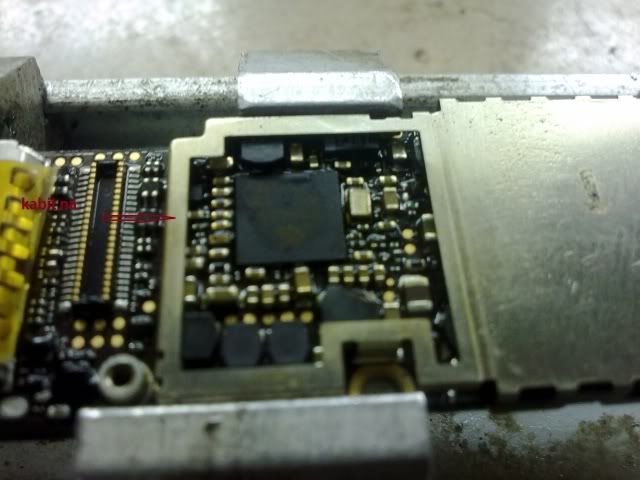
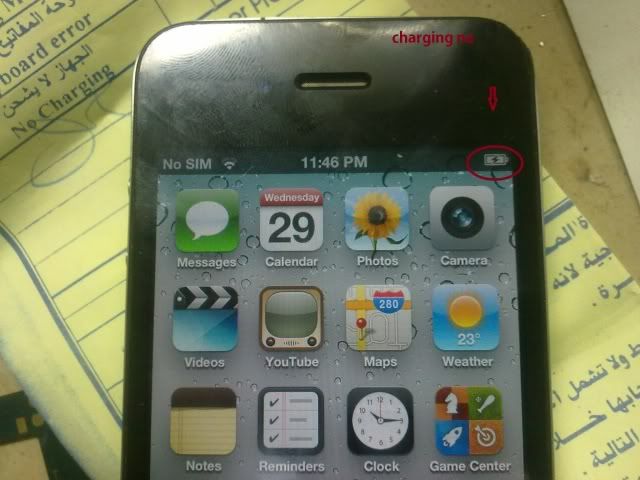
share ko lang po ito para sa inyo,.bali patay po ang unit,una ko ginalaw PM ic,nag ok na kasu hindi nag charge,pinalitan ko UI sa charging usb dock wala parin,.kaya reball ko nlang PM IC.
mas maganda ito kasi minsan kung PM ic ang ipatong mo sa nokia baord may posible pa na masira,kasi initin mo talaga ang PM ic,.ito safe para di agad masira PM ic,.
see pics,.
ayan flat pa mga balls kakalinis ko lang,
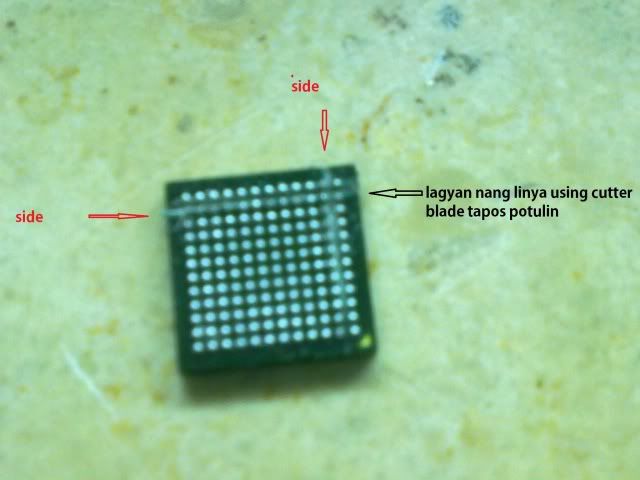
ito na,.may mga sirang board kayu like nokia n95,n79,n78,6300 etc,kunin nyo ang signal RF IC nya,.follow lng po sa pic kung panu mag Cut using blade cutter,
ayan guhitan at putulin nang blade cutter bali ang nokia RF IC is 12x12 balls
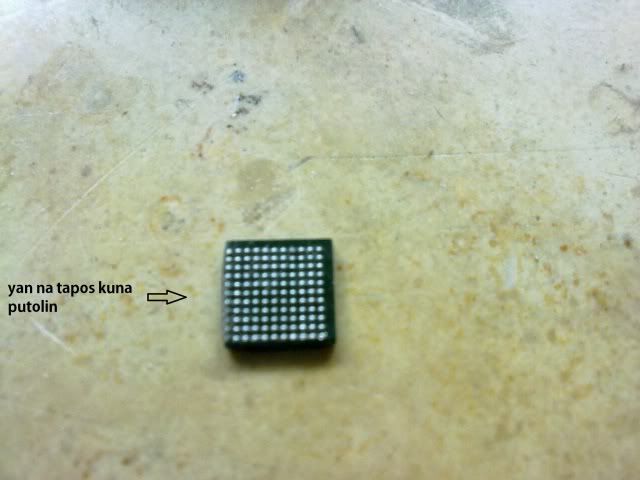
tapos ang PM ic 11x11 balls,kaya putulin nyo,.see pics.
ayan na putol kuna,.ito na mukha nang ic na nokia,
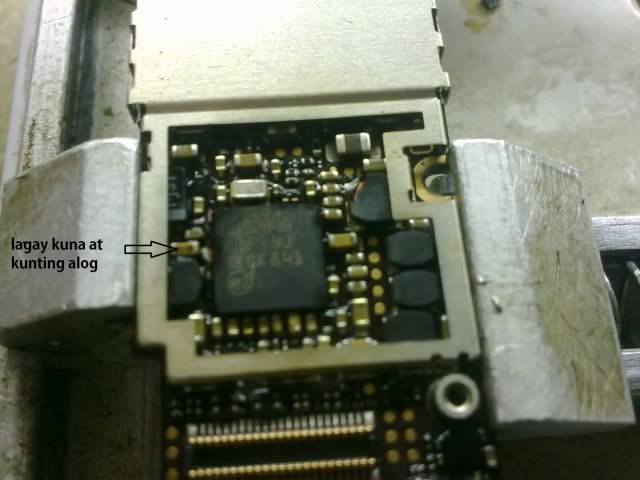
kaya lagay kuna gamit hotair din kunting alog,.
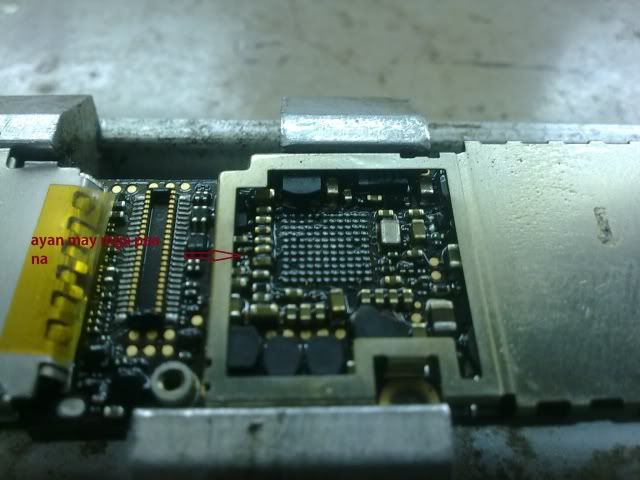
tapos tanggalin na,.check nyo pics may mga paa na,.ayus,.pwede na kabitan nang PM ic,
ayan kabit kuna,.
check kuna unit,.salamat at may resulta naman,.
ito lang po para sa mga nahirapan lang mag reball,.kasi ang bagong PM ic may mga paa nman,.sa mga walang paa lng na PM ic.



THIS TIPS AND TRICKS CREDIT GOES TO newfoundghori OF GSMSANDWICHsee you again next time for more tips and tricks for all mobile phone repairing
Thank you for Viewing this Post if you like to help others Please Share this.
To help us Please Donate with us

Monday, September 19, 2016
How to Download Torrents on IPhone and other IOS Devices?
How to Download Torrents on Iphone and other IOS Devices?
People use different softwares and apps to share and download their data files. Torrents become one of the most famous to download all kinds of files. You can download Torrent Files easily in your PC and laptop but when you just have iPhone then what to do? Here in this post we have a solution for your problem so now you can easily Download Torrents on your iPhone as well other IOS devices. If you want to download torrents on your iPhone (after jailbreak) then 1st you need to get a simple software called iTransmission you can easily get this app and then install on your mobile you can also get this app from Cydia App store without any cost.
Download Link: iTransmission
When download iTransmission in iPhone there is a small icon will appear on your Springboard just like below.

- If you want to install app on iPhone 1st you need to jailbreak it.
- Now click on icon and you will see screen like below image and some options in bottom.

- Now when you download torrent you click on + symbol and after clicking you will see some options like below image.

- Now click on URL and after clicking URL you receive screen alert just like below image and now Just Add URL( link of torrent what you want to download) then click OK.

- Now it will be added to your main menu and at start it will be paused, so tapping on the green resume button will start download.
- Tapping on a torrent will also show you some detailed information about the downloading torrent.

After finishing downloading you can receive a option to delete Torrent from your downloading list or you can delete everything.
Friday, September 2, 2016
Top 15 Most Useful iPhone Accessories
Top 15 Most Useful iPhone Accessories :

5. iPhone Projector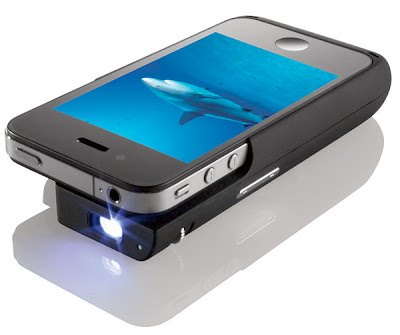

8. iPhone DSLR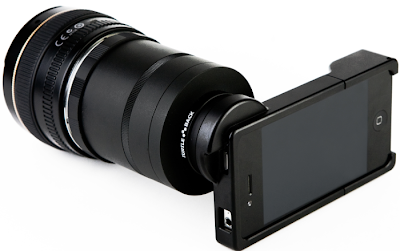
9. iPhone Holder
10. iPhone Steering Wheel
12. iPhone Tactile Keyboard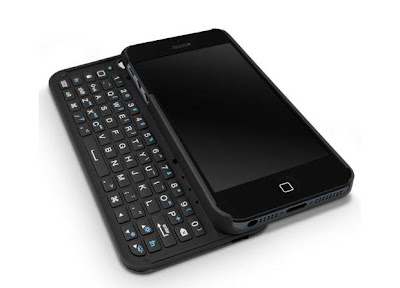
13. TV Hat
15. Retro Handset
Apple launched its 1st generation iPhone on June 29, 2007 and after its release it become best smartphone. It runs Apple's iOS mobile operating system, known as the "iPhone OS" the most recent iPhone, the sixth-generation iPhone 5. It is the most popular smartphone because of its cool features. It is best choice for people whenever they want to buy Smartphone. iPhone addicted can't spend single moment without it so that's why a lot of iPhone Accessories available in the market to provide ease to its users. Here in this post have listed Top 15 Most Useful iPhone Accessories which is very useful for its users
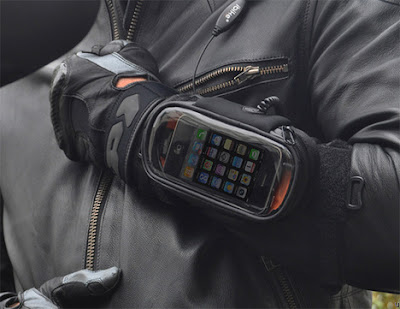
1. iBike Rider

All youngsters love biking so it is very useful accessory for all of them.
2. iPhone Wheel Mount
GoSmart Clip used to securely fastens iPhone to the steering wheel.
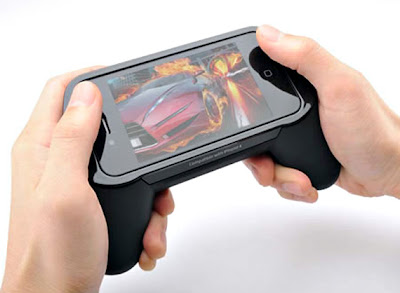
3. iPhone Grip
3. iPhone Grip

Great accessory for for those who love to play games. It is best to provide extra grip to your iPhone.
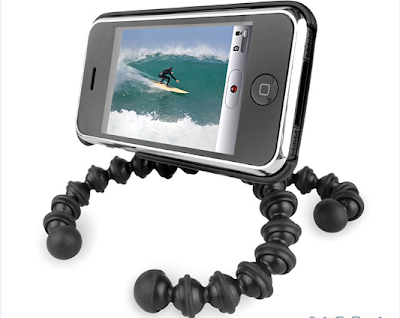
4. iPhone Tripod

It is called GorillaMobile and most flexible tripod which help you to take great photographs.
5. iPhone Projector

Sparkz is use to charge iPhone while projecting videos on the wall.6. iPhone Bicycle Mount

GoRide is best accessory which help to easily attach iPhone to your bicycle.
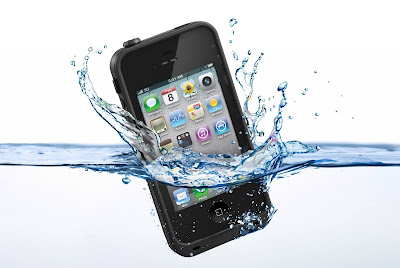
7. Waterproof iPhone Case

It is called DryCASE and it is a flexible waterproof case which allows complete use of your iPhone while keeping it dry and clean.
8. iPhone DSLR

It is called OWLE Bubo and it was made to help you to use SLR lenses with the iPhone.
9. iPhone Holder

People who don't want to take their phone in their hands, Vyne is best choice for them. It is a flexible and best hands-free viewing accessory for Apple iPhone.
10. iPhone Steering Wheel

It fulfill your need for speed with the Racer Steering Wheel for the iPhone.
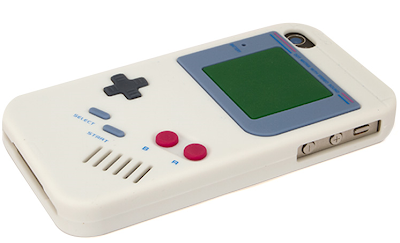
11. Game Boy iPhone Case

This is best accessory for gaming boy because it is a case that transform the outside of your iPhone into a Game Boy.
12. iPhone Tactile Keyboard

If you like to type through keyboard then TK-421 iPhone case is best for you. It comes with a real flip-out tactile keyboard.
13. TV Hat

If you want to like watch movie in your own personal home theater then TV Hat is best choice because it turns an iPhone into your own personal movie theater.
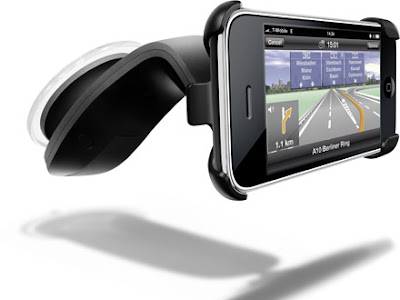
14. iPhone Windshield Mount

WindowSeat mounts as its name suggest it is best to your Apple iPhone at eye level and putting all of your street maps within view and reach.
15. Retro Handset

YUBZ make you feel like old telephone set and it also protect you from radiation and get you noticed.
Monday, August 22, 2016
iPhone 5s ios 7 Current Model Leaked

iPhone 5s ios 7 Current Model Leaked

For more information watch below video.
iPhone 5s ios 7 Current Model Leaked
Top Five iPhone 5 Problems, Bugs and Complaints

Top Five iPhone 5 Problems, Bugs and Complaints
The iPhone 5 may be a technical achievement by Apple, but as always happens when you produce tens of millions of copies, something is bound to go wrong. Reports from early adopters of the latest generation iPhone have been overwhelmingly positive, however there are some users who have experienced problems. None of these have stemmed the record-breaking sales that started on launch day.Some Apple fans might be waiting to pull the trigger on an upgrade until early iPhone 5 issues are worked out. Often an iOS update will solve some problems, while others are manufacturing glitches that can be returned under the Apple Care warranty. So what has been making headlines in the "needs improvement" department? Here are the top 5 problems, issues and complaints revolving around the iPhone 5 launch.
1. Wi-Fi Data

A carrier update has already been issued to Verizon iPhone 5 owners, addressing a bug where cellular data plans were charged for usage over Wi-Fi. This could be a serious issue for heavy data users who depend on Wi-Fi to prevent overages and additional charges. Verizon has pledged not to charge anyone for miscalculated data usage due to the iPhone 5 problem. Some reports have indicated the issue may not be limited to Verizon. AT&T and Sprint have not issued carrier updates yet, so it's not clear whether or not these subscribers are affected. Watch your data usage carefully when you first get the iPhone 5 to make sure this bug doesn't show up.
2. Scuffgate

As the first round of pre-orders were fulfilled, some iPhone 5 owners opened the packaging to find a damaged aluminum chassis. Scuffs and scratches in the metal or around the polished bezel were discovered on brand new devices as the layers of protective film were removed. Clearly a manufacturing issue was at fault, and some reports have indicated that Apple has tightened up quality control standards to reduce factory damage. The aluminum will of course naturally scratch and dent with wear and tear, however it would be a surprise to receive a new iPhone 5 already nicked.
3. Keyboard Flicker

What sounds like it could be an iOS 6 software problem, some iPhone 5 users are seeing a strange flicker when the keyboard appears on screen. Whether they are entering a password for the App Store or using another application that brings the keyboard scrolling up, dark static lines across the display flicker and disappear. Some have reported the bug only appears when typing certain characters. In any case, although the problem may be disconcerting it doesn't sound like the issue is affecting normal keyboard operation. Apple is sure to address the problem in an upcoming iOS update.
4. Apple Maps

With all of the hoopla surrounding Apple's home-brewed Maps application, fans of Google Maps were disappointed when the software was finally released. Mapgate revealed screenshots of missing roads, places with the wrong name, and low resolution satellite imagery. Apple has made it clear that Maps is a work in progress, and the more people that use the software the better it will become. Transit directions and street view may be missing, but Flyover mode in 3D and turn-by-turn navigation don't come with Google Maps. iPhone 5 owners who miss the old version can save the Google Maps web app to their home screen to restore full access to Google's product.
5. Light Leak

After the white iPhone 4 saga from a couple of years ago, Apple seems to have the two colors they produce down pat. Still, there have been some reports of white iPhone 5 units with a light leak around the edge of the unit. The problem happens when using the iPhone in the dark. The illuminated display lighting can be seen peeking out through a gap between the front glass and the aluminum sides of the device. iPhone 5 users complaining of the problem have posted on forums, stating that Apple replaced their devices under warranty.
Sunday, August 21, 2016
Top 4 browsers support flash player on iPad and iPhone
.jpg)
Top 4 browsers support flash player on iPad and iPhone
Puffin:
Puffin Web Browser is quick and speedy web browser supporting flash player on iPad and iPhone. Puffin Web Browser provides the desktop web browsing compatible with tablets and smartphones with the help of cloud server. Puffin browser also has Optional Mouse and Keyboard, Webpage Bookmark, Search suggest, Popup blocker and Top sites.
Puffin Web Browser is quick and speedy web browser supporting flash player on iPad and iPhone. Puffin Web Browser provides the desktop web browsing compatible with tablets and smartphones with the help of cloud server. Puffin browser also has Optional Mouse and Keyboard, Webpage Bookmark, Search suggest, Popup blocker and Top sites.
.jpg)
Photon:
Photon Browser is a prevailing new browser with Flash ability designed to improve your browsing experience on the iPad. Photon browser is a influential and multipurpose Safari alternative that progressing in its Flash support. Photon browser enables you set bandwidth 3 or 5 for sharper resolution, 6 for higher frame rates . Photon Browser allows you to play Flash games such as free Facebook games, use Flash apps.The browser available with Free and Paid version.
.jpg)
iSwifter
iSwifter is best flash player allows you to watch videos, Flash websites, and best of all, Flash applications such as Facebook Social Games.You can play your favourite games,watch your favorite shows, music and useFlash applications on your iPad.Its need internet connection to play. You can enjoy its trial free version for 1 week.
.jpg)
Skyfire
Those videos you cannot watch on you ipad, skyfire enable them to play on your iPad.You can use facebook,twitter by this flash player. This support only videos to watch.
.jpg)
Tuesday, August 16, 2016
How to enable private browsing in iPad / iPhone
How to enable private browsing in iPad / iPhone
.jpg)
How to enable private browsing in iPad / iPhone
Steps to enable ipad private browsing:
1). Click on “Settings” icon in your iDevice.

2). Navigate to and click on “Safari”
3). Under ‘Privacy’ slide the switch next to “Private Browsing” so that it displays “ON”
4). You can additional squeeze the Safari privacy by adjusting cookie actions in the same menu. You can set allow Cookies to “Never, From Visited or Always”.
5). You can stop private browsing by going back to the same menu and sliding ‘ON’ to “OFF”. There is no destruction if you exit private mode ‘ON’ all the time.
Note: If you have Google Chrome in your iPad or iPhone, you can enable private browsing in chrome browser. Method is same as explained above for Google Chrome.
Sunday, August 14, 2016
5 Things To Expect In The iPhone 5S
.jpg)
5 Things To Expect In The iPhone 5S
iPhone is most advance invention of technology.iPhone has many exclusive features for example iPhone 5.Now,new discovery is iPhone 5s with new and extraordinary features.Upcoming iPhone is set to be announced on September 10. If so, it will have been approximately just 1 year among iPhone updates, setting up Apple up for a gigantic back-to-school.iPhone will come on the stage with ios 7 operating system.There are 5 things which we expect from the upcoming iPhone 5s.
1. Welcome iPhone 5S And Little Sister 5C
Apple’s designation caucus for the iPhone is reasonably routine.iPhone is available in many version like iPhone 3G, iPhone 4, iPhone 5.Next is “S” version with iPhone 3GS, iPhone 4S. This should be an “S” year.Now upcoming is iPhone 5s. Apple could toss a twist in the plans by just calling it the “new” iPhone, the way it called both the third and fourth generation iPad the “new iPad” as an alternative of the iPad 3 and iPad 4.

The iPhone 5S is like new flagship, with price of $199 on a two-year agreement from the wireless carriers in the United States.This will be new exclusive addition ito into Apple’s iPhone series called “iPhone 5C.” The iPhone 5C will have a plastic back and come in a mixture of colors. Changing from the colorless black and white of previous iPhone releases would be much like Apple did when it diversified its iPod lineup in the 2000s. It's evenhanded to suppose that the iPhone 5C may be $99 on a two-year agreement .
2. A Serious Print Job
Apple has a company called “AuthenTec” which makes chips for fingerprint sensors. These kinds of sensors can be worn for “biometric authentication”. Biometric authentication is a method of using distinctive and matchless material uniqueness like fingerprints or retina patterns for recognition and other security objectives.
Apple has a company called “AuthenTec” which makes chips for fingerprint sensors. These kinds of sensors can be worn for “biometric authentication”. Biometric authentication is a method of using distinctive and matchless material uniqueness like fingerprints or retina patterns for recognition and other security objectives.
.jpg)
Apple is coming with a fingerprint sensor to the iPhone 5S. It would be located on the recognizable round “home” button of the phone, which may be convex, so a portion of it would be above the bezel/display of the phone. The home button would have a azure casing to help it stand the test of time. Apple will make a mobile expenses system like that of the Square Wallet, where you use your fingerprint to unlock your money when shopping. This type of sensor will be a attention-grabber like Siri was originally thought to be. It would be new type of handy device.
3. The Interface Is Flat:

In June, Apple announced iOS 7, the which is fresh and latest version of the operating system compatible with iPhone and iPad. 5 variety of beta versions at the forefront of launch of the new iPhone.The blueprint of iOS 7 has "flat design" that makes a d different approach. Flat designs shun the real-life individuality of apps. The Notes app no more looks like a yellow legal pad and now is a simple white on black design.
These alternation pervade iOS 7. The typescript for most of the apps is thinner and the buttons are now borderless. Ios 7 is available with friendly interface.
4. A Camera So pleasant You'll Flash double:
iPhone 5S will have dual LED flash for pictures. According to information, the special flashes will be white and a sort of off-yellow designed for taking “natural” looking photos. iPhone 5S will come with camera of 8 megapixels and might be more.
.jpg)
Apple will also have four different camera in the iPhone 5S through iOS 7 like “square” mode to take Instagram-like photos, a video mode, a panorama mode and the normal point-and-shoot mode.
5. A Smarter Siri:
Apple’s essential supporter is getting a strapping promotion. It will be capable to spout directly into a range of additional databases including Wikipedia and Twitter. It will also use Microsoft’s Bing search engine to give up search results. Siri will have superior, appropriate results for iPhone users and should be able to carry on improved conversations within the app.

Siri will be able to manage more aspects of the iPhone. You'll be able to tell Siri to return a phone call, control iTunes Radio or play a voicemail. Users will be capable to decide whether Siri uses a male or female voice.
Subscribe to:
Posts (Atom)