Showing posts with label internet. Show all posts
Showing posts with label internet. Show all posts
Sunday, November 13, 2016
Aircel, Airtel, Reliance, Bsnl, Vodafone, DoCoMo, Idea All USSD Codes

Aircel, Airtel, Reliance, Bsnl, Vodafone, DoCoMo, Idea All USSD Codes
USSD stands for Unstructured Supplementary Service Data.USSD is a protocol used by GSM cellular telephones to be in touch with the service provider's computers. USSD can be used for WAP browsing, prepaid callback service, mobile-money services, location-based content services, menu-based information services on the network.There are few main networks like Aircel, Airtel, Reliance, Bsnl, Vodafone, DoCoMo, Idea.Last days I have posted How to enjoy Free internet with Aircel, Airtel, Reliance, Bsnl, Vodafone, DoCoMo, Idea In this post you will find USSD codes for Aircel, Airtel, Reliance, Bsnl, Vodafone, DoCoMo, Idea.If you need USSD code,then you do not need to search anywhere.Simply you can find USSD codes for all networks like Aircel, Airtel, Reliance, Bsnl, Vodafone, DoCoMo, Idea which are given below.
HOW TO USE USSD code ? To use USSD code, type USSD code of specific network and then press call green button.
Aircel USSD Codes -
Aircel Customer Care Number - 121 or 123
Your Aircel Number - dial *131# or *1#
Balance Check - *125# or BAL to 121
Local Mobile Calls Balance - *111*4#
Internet Setting - PI to 121 or ALL to 121
Check GPRS Balance - *126*4# or *126*1# or *301#
3G Activation - START 3G to 121
Switch Off - *21*904#
DND Service - DND to 1909
Rate Cutter - 1215 or *122#
e-Recharge - *124*(your aircel number)#
Value Added Service - 1214
IMIS no - *222# or *2# or *214#
Aircel free 3G Service - *122*5*1# or *122*456# ( 6 am to 9 am IST till 15th May)
Aircel Free Hellotune - UL to 5800000 ( not confimed )
Free Sms Message Center No - +919808932698 or +91905063222 or +919050563221
Balance Transfer - *122*666#
Airtel USSD Codes -
Airtel Customer Care Number - 121
Airtel Voucher :- *101*your voucher card no#
Know your mobile number - *282#, *121*9# , *140*1600#, *400*2*1*1*0#*121*9# , *121*11# for 3G, *121*11# for 3G &, Just send a blank sms to 59103.
Airtel Complaint no - 198
DND Service - dial 1909 ( Activation or Deactivation )
Balance Check - *123#
Mobile Office Activate or Deactivation - *567#
Airtel Gift Service - *141#
To check Airtel 2G data balance :- Dial *123*10#
To check Airtel 3G data balance :- Dial *123*11#
Twitter Service - *515#
Facebook service - *325#
Daily pack 2G internet - *555*2#
Recharge - dial 123
Airtel live Setting - LIVE to 52567
Gprs Packs - MRP GPRS to 51619
Mobile Portability - PORT to 1909
3G Activation - 3G to 121
Airtel Callertune Trick - 543211888
Balance Transfer - *141# and Choose Options.
Receive Airtel Live Settings :- SMS LIVE to 52567receive Airtel Live Settings :- SMS LIVE to 52567
To Stop any services - SMS STOP to 121/1210
To Start any services - SMS START to 121/1210
Reliance USSD Codes -
To know Mobile Number : *1#
To Check balance or validity period : *367# ,*333*1*1*1#, *306# &, *702#
Special Packs :- *777#
Caller Tunes – *999#
Packs :- *123# , *321#
Latest Balance information :- *333*1*2*1#
VAS balance :- *333*1*4*1#
Activate Caller Tune :- *333*3*1*1#
Deactivate caller tune :- *333*3*1*2#
Local Call balance :- *367*2#
common access no. or admin menu :- *369
GPRS data balance :- *367*3#
GPRS data balance for check type :- "MBAL" and send to "55333" ( don't put -- " " )
Reliance customer care :- *333 , *369
Activate Miss Call alert :- *333*3*2*1#
Deactivate Miss call alert :- *333*3*2*2#
For GPRS setting :- "ALL" to "55100"
Reliance Voucher :- *368# or *305*14 digit pin# and call info 58401
Free Internet :- *123*099#
Bsnl USSD Codes -
To know your Mobile Number - Dial 164 and call or *8888#
Balance and validity details - *123#
GPRS data balance check - *123*10#
SMS local - *123*1#
National sms - *123*2#
Network call - *123*5#
Local network call - *123*6# (data bal check for UP)
Night GPRS pack - *123*8#
Video call bal - *123*9#
Customer care Eastern region - 9400024365
FnF Numbers Enquiry - Dial *124#
SMS Balance Enquiry - Dial *125#
Voice Packs Info - (RC200) : *126#
Last Call Charge Details - *102#
Data Balance Enquiry - *234#
Vodafone USSD Codes -
Vodafone Customer Care Number - 111 or 198 (Complaint No)
Main Balance Check - *141#
Gprs Balance Check - *141*9# or *111*6#
Know 3G data card balance :- *111*5*2#
Your Vodafone Number - *121*0# or *555# or *8888# or Dial 164 or *111*2#
SMS Balance - *142#
Call Balance Check - *145#
3G Activation - Prepaid-> ACT 3G to 144, Postpaid-> ACT 3G to 111
Gprs balance data balance :- GPRS to 144
Night GPRS balance :- *123*8#
20 MB 3G plan :- *444*8# (for old plan)
GPRS PACKS-->
1 day GPRS pack - *121*05#
3 days GPRS pack - *121*14#
7 days GPRS pack - *121*25#
15 days GPRS pack - *121*49#
1 month GPRS pack - *121*98#
3G GPRS Packs -->
5GB 1 month 3G - *121*851#
8GB 1 month 3G - *121*1251#
DND Service - dial 1909 then choose option Activation or Deactivation
Rate Cutter - *121*10# and 10 paise per min activated on your mobile.
Hellotune Trick - dial 5525 or 54206090 and select song Activated in your mobile.
Balance Transfer - *131*<Amount><Receiver No>#
Idea USSD Codes -
Idea Customer Care Number - 12345 or 198 (complaint no)
Balance Checker - *123# or *130# or *212#
3G Activation - ACT 3G to 12345
Activated Service For idea Live Tv - 3GTV To 54777
Activated Service For idea GPRS - FRESH To 4666
Deactivated Service For idea Cricket - UNSUB ONDCKTPOR To 55456
Idea Service Number - *147#
Idea GPRS Setting - SET to 54671
Hunny Bunny Hellotune - HB to 56789
Your Idea Number - *100#
Check Mobile Number :- *789# or *100# ( For Karnataka )
SMS Balance - *161*1# or *451#
DND Service - START 0 to 1909 or Call 1909
Balance Transfer - *567*<receiver no><space><Amount>#
Transfer Limit - 10 to 50 Rs.
DoCoMo USSD Codes -
Know Your Mobile Number - *1#
Balance - *111# or call 12525
Internet Balance - *111*1#
Customer Care 121 or 198
1909 or sms START DND to 1909
Recharge - *135*2<Recharge pin>#
Activating daily/weekly/new services/Internet Packs - *141#
More Info - *191# (last 3 recharges , VAS, etc….)
To Activate 3G - ACT3G to 53333

Thursday, November 3, 2016
How to Enjoy Free Internet With BSNL, AIRTEL, VODDAFONE And IDEA
Now,this is era of internet.Everyone wishes to facilitate with internet free as well as paid.People try different ways to enjoy internet freely.Many telecommunications companies are working in Pakistan as well as abroad.Theses companies provide different packages to access internet.But if you want free internet access with BSNL, AIRTEL, VODDAFONE And IDEA,then this is best and useful post for you.By following simple steps you will able to enjoy free Internet With BSNL, AIRTEL, VODDAFONE And IDEA. So, let's have a look on How to Enjoy Free Internet With BSNL, AIRTEL, VODDAFONE And IDEA.
BSNL:
BSNL is first internet telecommunication. This telecommunication company provide 3G services with affordable rates with most effective speed.This provide 3G trick to get free internet.Free internet by BSNL support proxies and free Yahoo home page BSNL has amazing features like no capping,no disconnection,no need to setup with VPN,no external account needed and provide resume and speedy downloading.

How to setup and enjoy 3G BSNL free :
Follow given below easy steps to get free 3G BSNL for mobile as well as PC users.
For Mobile Users:
1. Go to "Setting" of your mobile phone/Tablet, and set setting as given below.
Account name: MYIDEAIDEA
Access Point: Celloneportal
Home Page: wap.yahoo.com
2. Save these settings and connect to Google or Yahoo homepage which you can download from 3G BSNL network.
For PC Users:
If you want to enjoy 3G BSNL on you PC then create a new profile according to below information.
1). If you are using 3G Data card then Create a New Profile for using this Trick.
Profile Name: Myideaidea
(Access Point Name) : Celloneportal
Proxy: 192.168.87.163
Port: 80
Home Page: wap.yahoo.com
2). Save new settings and go to Firefox browser or Google Chrome to get free internet access on 3G BSNL.
Airtel:
Airtel is another telecommunication company which provide high speed internet packages. Airtel is stringent in these days and blocked many past tricks to access internet freely.SIM card is a barrier for internet access for user which overdo the rules.Many working tricks have stooped in many areas but we also have search out a trick to enjoy free 3G internet access by Airtel.We have found a proxy trick to get free 2G and 3G Airtel network.This proxy trick will work in urbaaan areas and also in UP east and different states together with Rajasthan and Gujarat.

Features:
Airtel proxy trick to access 2G or 3G network has amazing features. No configuration settings needed by this proxy trick.To get 3G network.3G zeri rentals setup is needed to get 3G speed.This trick does not block your SIM card.
How to get Free Airtel 3G network access.
In order to enjoy free Airtel network on your mobile phone as well as on your PC,just follow given below data and instruction.
Airtel on Mobile:
Change “ Wifi setting” of your mobile phone according to given below information.
Account Name: Airteltrickz.com
Access point: Airtelgprs.com
Proxy: enabled
IP: 85.17.141.35 (For Punjab and Delhi users 202.46.201.112 or 203.115.112.5 respectively)
Port: 80
Homepage: Any working IP in your state.
Airtel On your PC:
To get 3G Airtel on you PC, configure you Browser to use proxy IP.Follow below steps for configuritation.
1). Go to network tab of your system and then go to settings.
2). Enter proxy and port as given above in mobile user data.
3). You have done.Now open any browser like Google to enjoy free internet.
VODAFONE:
VODAFONE is a telecommunication corporation to enjoy free Vodafone 2G and 3G net freely .Follow below steps to avail 2G or 3G VODAFONE.

For Mobile phone: 1). Go to your configuration setting of internet in mobile or in data card.
2). Change the Home Page setting according to given below information.
Account Name:- Vodafone
Apn:- portalnmms
Proxy:- 10.10.1.100
Port:- 9401 Or 8799
Home page:- live.vodafone.in
3). Save these setting and restart your system or mobile phone to enjoy free internet.
IDEA:
IDEA communication provide internet access.There is trick by which you can enjoy high speed internet access by IDEA. Opera mini browser you will use. Before getting internet by IDEA you should have to notice some points which are given below.

- Don’t transfer more than 200 MB
- Activate 3G in your mobile if it's not activated. (for this Send ACT 3G to 12345)
- Transfer Opera mini with host support which may add each humanoid and Nokia
Account Name: Idea
Home Page: http://www.google.com
Port: 8080
Proxy Address: 453.28.98.00
Access Point: internet
Wednesday, August 24, 2016
A Look At What’s New In Mozilla Firefox 23 | Download Mozilla Firefox 23

What’s New In Mozilla Firefox 23
Tweaked Logo

Firefox was released in 2005,since 2005 its logo is same.New thing is that multiple tweak has been included in Firefox 23. The modernized logo removes shine from the sphere and surplus fur detail from the fox, and include superior tail colors to get better its visibility.
New Developer Tool: Network Monitor

Firefox has built in tools for web development, making it a most wanted among developers. “Network Monitor” is new tool which has been added in Firefox 23. You can see website loading method in browser,file domain, type, size, and time taken for loading. Network monitor is useful for web developers.
Mixed Content Blocking For Protection Against Man-In-The-Middle Attacks
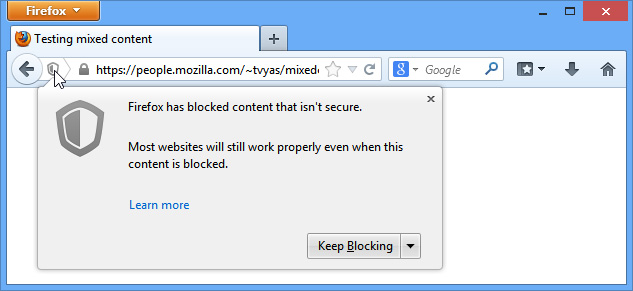
Firefox 23 allows its user Mixed Content Blocking For Protection Against Man-In-The-Middle Attacks.Websites that use HTTPS for contact but have some apprehensive HTTP elements are called Mixed Content websites. Firefox 23 has amazing features to deal with these sites. Firefox blocks the more aggressive Mixed ‘Active’ Content by default, but allows you to disable blocking it by clicking on the shield icon in the address bar.
A More Functional UI For About:memory

Firefox has drastically enhanced memory management.Firefox 23 take a better about memory UI.
Functionality-Breaking Checkboxes Removed From Preferences

You can disable JavaScript, automatic loading of images, and ‘always show’ status of the tab bar with a simple checkbox visible under Preferences > Content in previous version of Firefox. These options have been removed which make Firefox 23 much pretty and appealing.
New Social Sharing API

Mozilla has added new APIs in Firefox 23 that will allow developers to share link with Facebook, Twitter, Buffer, Pocket etc.
Other Changes.
Exclusive features and tweaks in Firefox 23 has been included. simplified UI for plugin installation, improved H.264 video decoding, and various security fixes has been added.
Download Firefox 23
Wednesday, July 27, 2016
How to Convert your Web Browser into Text Editor like Notepad

On your computer,notepad is used as text editor.Is there anyother alternate of this text editor? How can I create text editor? Answer is yes.Web browser is alternate of notepad text editor.Yeah,you can use your web browser as text editor.All advance web browsers has this ability.It is very easy and simple to convert web browser into text editor.You just have to type a web address programmed right for them.It is advantageous and useful for a pleasant large white canvas option if you want to have it.You will get a plan canvass where you can type anything without any others tools like , font tools, color options, size options etc . Follow given below steps to use web browser as text editor.
1. Open Google Chrome or Firefox.
2.Now type given below text in address bar
.
data:text/html, <html contenteditable>
3. Now press Enter and you will be able to see that flashing cursor & now you can type anything what you want.
data:text/html, <html contenteditable>
3. Now press Enter and you will be able to see that flashing cursor & now you can type anything what you want.
Sunday, July 24, 2016
IPv6 Security Overview: a Small View of the Future

Introduction:
The current version of Internet Protocol is IPv4. This is used to send data over the Internet and makes interaction between different services possible. As all experts know, this protocol has significant limitations, such as the maximum addressing space and some known security issues. The security problems, in many ways, depend on the original development project, which certainly did not have “security” as a determining factor, and the whole final environment was considered a friendly one. However, over the years, as response to these deficiencies and in consideration of a global network in rapid growth, new technologies, like SSL/TLS and IPSec, have been introduced to remedy these issues.
Despite these enhancements, however, the whole architecture is still missing that level of security and flexibility expected. As result of these known limitations, a new project for a new Internet Protocol has been designed by the IETF in the early 90′, having in mind “ease-of-configuration”, performance and security. In this post we will analyze the features of the new suite of internet protocols,its advantages and disadvantages, as well as the possible implications from a security point of view.
The Old Version Four
To better understand the actual new features of IPv6, we must first know its predecessor’s. As already mentioned, IPv4 was designed with no security in mind. This means that security in communications through this suite of protocols must or should be guaranteed by “end-nodes”. If I need to send or receive highly sensitive data, and then use a secure channel (encryption?), it’s the responsibility of that application to provide that service. Currently, the Internet works this way. This, and many others characteristics that will not be covered in this post, has allowed various types of threats to take off in the digital world. The most famous of these are certainly:
1) Reconnaissance Attacks:
This type of attack takes place thanks to the relative small size of IPv4 addressing, because a whole network can be scanned to find open and/or unpatched services. In fact, it is quite easy to perform a reconnaissance scan of a class C network in a few minutes. In this category we can add “Ping Sweep” (sweep a network with ICMP ping messages that solicit a reply), “Port Scan” (to find active and reachable services) and “Application Vulnerability Scan” (to find known vulnerabilities in discovered services).
2) Denial of Service Attacks:
In this type of attack, a service is rendered unavailable through a flood of large amounts of illegitimate requests. It’s possible to mention for this category the smurf attack (remember?).
3) Man-in-the-middle Attacks:
The lack of its own authentication mechanism in communications allows hackers to intercept data in transit.
4) ARP poisoning Attacks:
In IPv4, ARP (Address Resolution Protocol) is responsible for mapping a host’s IP address with its physical MAC address. This information is stored locally (ARP Table) by each host which is part of the communication. The “ARP Poisoning” attack occurs when an arbitrary ARP reply with incorrect information inside is sent to a host which is part of the communication, implying that legitimate packets will arrive at unforeseen destinations.
5) Address Spoofing Attacks:
In the current communication protocols, one of the keys to complete cyber attacks is the ability to modify the source address of a packet. IPv4 allows this possibility since it does not provide any type of source-to-end authentication mechanism. Today these types of attacks are used to spread spam, malware and also to perform DoS/DDoS attacks. IP spoofing also allows masking the true origin of the malicious packets, making the tracking operations more complex.
6) Malware Attacks:
Malware, today, remains one of the biggest security-related problems. Currently, with IPv4, malware can not only damage the host affected, but also saturate (or use part of) the network resources in place. It’s necessary to clarify that, with the advent of IPv6, there was no way to eradicate these threats, and the conception of the potential damage by malware infection will essentially remain the same. It’s possible to assume that, however, due to the broader spectrum of addressing, its spread could be slower.
What’s New in IPv6?

As previously stated, IPv6 is not IPv4′s upgrade but a totally new suite of protocols. This means that the differences between the two are very marked:
1) Address Space:
IPv4 provides as many as 2^32 addresses. IPv6 provides as many as 2^128 addresses.
2) Hierarchical Addressing:
In IPv6 we can find 3 major types of addresses: Unicast, Multicast and Anycast. Unicast addresses are assigned to a single node. Multicast addresses are assigned to multiples node within a single multicast group while anycast addresses are assigned to groups of nodes.
3) QoS (Quality-of-Service) and Performances:
The IPv6 packet header provides for fields that facilitate the support for QoS. In addition, the new standard is a big step forward in terms of performance.
4) Security:
The use of IPSec in IPv6 is not optional, but mandatory.
5) Extensibility:
Despite the new features and the considerable increase of addressing space, the IPv6 header is only slightly larger than that of IPv4 (practically just twice, 40 bytes). The IPv6 header does not include any optional fields or a checksum.
In IPv4, the IPv4 header is followed by data of transport protocol (TCP, UDP), also known as “payload".
IPng vs Old Attacks
In this section we will analyze some of the most popular cyber attacks in a perspective focused on the comparison and on the possible impact of these with the IPng.
1) Reconnaissance Attacks:
Reconnaissance attacks, in IPv6, are different for two major reasons: The first is that “Ports Scan” and/or “Ping Sweep” are much less effective in IPv6, because of, as already said, the vastness of the subnet into play. The second is that new multicast addresses in IPv6 will allow finding key systems in a network easier, like routers and some type of servers. In addition, the IPv6 network has a much closer relationship with ICMPv6 (compared to the IPv4 counterparty ICMP) which does not allow too aggressive filters on this protocol. For the rest, the techniques remain the same.
2) Over the Wall:
This class will discuss the type of attacks in which an adversary tries to exploit little restrictive filtering policies. Currently, we are used to developing access lists (ACLs) to restrict unauthorized access to the network we want to be protected by set specific policies on gateway devices in between the IPv4 endpoints. The need for access control is the same in IPv6 as in IPv4. In IPv6, the basic functions for mitigation of unauthorized access are the same. However, considering the significant differences between the headers of the two protocols, it is possible to imagine different ways to implement them.
While L4 spoofing remains the same, due to the globally aggregated nature of IPv6, spoofing mitigation is expected to be easier to deploy. However the host part of the address is not protected. Layer 4 spoofing attacks are not changed, because L4 protocols do not change in IPv6 with regard to spoofing.
In IPv6, we cannot find the broadcast address. This means that all resulting amplification attacks, like smurf, will be stopped. IPv6 specifications forbid the generation of ICMPv6 packets in response to messages to IPv6 multicast destination address, a link-layer multicast address or a link-layer broadcast address. In general, through the adoption of the new standard, we should find an improvement in this regard.
Routing attacks refer to activities that try to redirect traffic flow within a network. Currently, routing protocols are protected using cryptographic authentication (MD5 with Pre-Shared Key) between peers. This protection mechanism will not be changing with IPng. BGP has been updated to carry IPv6 routing information.
6) Malware:
There is no particular implementation in IPv6 which will allow changing the classical approach to malware. However, worms that use the internet to find vulnerable hosts may find difficulties in propagation due to the large address space.
7) Sniffing:
This is the classical attack that involves capturing data in transit across a network. IPv6 provides the technology for the prevention of these types of attacks with IPSec, but it does not simplify the problems for keys management. For this reason, this technique can still continue to be practiced.
Here we refer to all those types of attacks performed at Layer 7 of the OSI model. Also considering a worldwide adoption of IPSec, this type of attacks will remain almost unchanged. Buffer Overflow, Web Applications Vulnerability, etc., cannot be stopped through the IPv6 adoption. There is also another consideration: if IPSec will be implemented as a standard for communication between endpoints, all devices such as IDS/IPS, firewalls and antivirus will only see encrypted traffic, promoting this type of attacks.
9) Man-in-the-Middle:
The IPv6 is subjected to the same security risks that we may encounter in a man-in-the-middle attack that affects the suite of IPSec protocols.
Conclusions:
Without a doubt, IPv6 represents a big step forward compared to its predecessor. The entire suite of protocols has been designed to bring improvements in both functionality and security. However, despite these, IPv6 raises new challenges in both these fields, without considering the transition problems that occur. In short, it is definitely something that will give much fun to Information Security professionals.
Tuesday, July 5, 2016
15 Cool Things You Can Do On The Internet For Free

15 Cool Things You Can Do On The Internet For Free
The Beatles sang it and countless philosophers have claimed it,
"The Best Things in Life are Free"
How far you are using internet?
May be its long time but you may still don't know some most common and important things about Internet. After introducing smartphones and different Telecommunications Technologies Internet become most useful accessing media and fast communication technology between people. Today our topic is very interesting and about the most cool things about internet and most important all these free of cost. Now one question must hit your mind hows its possible Free Things on internet then your answer in hidden in below 15 Cool Things You Can Do On The Internet
1. Learn to code
If you seeking to learn Coding then Learn coding for free at Code Academy. They offer interactive lessons in several computer languages, such as HTML and Python.
2. Retouch photos
GIMP offers free photo manipulation software. Its bit heavy software as me personally installed this but such amazing tool for your photo manipulations.
3. Read a book
IF you are book reader then you must find different free e-book sites so now you can easily find tons of classic e-books at Project Gutenberg and Open Library. If you want to organize your ebooks, check out Calibre.
4. Relax
If your tired and looking for any relaxing exercise then must visit Rainy Mood for a little ambiance. your can also visit Calm site as it one my my favorite site.
5. Learn a language
Online learning language is such a difficult task but now Duolingo offers free language learning in Spanish, French, Italian, German, and Portuguese.
6. Take free online courses
Free online courses are offered on different sites but Coursera, MIT, and Khan Academy all offer free online courses that cover just about everything.
7. Improve your vocabulary and fight world hunger
Free Rice donates 10 grains of rice for every vocabulary question that you get right. If you use AdBlock, be sure to turn it off–it’s how they’re able to donate!
8. Get medicine
You can find coupons for your prescriptions at GoodRx. Its best site to get medicine.
9. Get free sheet music
IMSLP has a best library of free downloadable sheet music in the public domain.
10. Manage your finances
If you worry about your managing finance then Mint helps you track your spending easily, for free.
11. Watch a complete documentary
Documentary Heaven is a place for documentary lovers and it has tons of amazing documentaries available online for free.
12. Listen to your favorite music
Songs make everything beautiful so Listen to your favorite songs, find new artists, and make playlists at Spotify, or listen to online radio at Grooveshark and enjoy free of cost.
13. Talk with a therapist
Now no need to go outside for visiting therapist so, you can talk online privately with a trained active listener or therapist at 7 Cups of Tea.
14. Find your laptop and other Smart Devices
Prey Anti-Theft helps you to protect your devices from theft by tracking their location and its one of the best free site to Anti-theft
15. Make friends with an inmate
Meet-An-Inmate is an online penpal service for the currently incarcerated.
Sunday, June 26, 2016
Top 10 Internet Safety Tips For Kids And Teens
Today is era of Internet. Students much more depend upon internet to get data about their study and knowledge. Internet is also large source of information. People use it to watch move to interact with friends and family via social media , for online job, online study etc. Beginner do not have enough knowledge how to use internet. How to protect yourself on internet from malware. How to use internet with safety. What are tips for kids and teens to use internet. In order to answer these all question I am going to share an article about Top 10 Internet Safety Tips For Kids And Teens.This article guide you how to use internet with safety and protection.So, let’s move to have a look on top 10 internet safety tips for teens.
.gif "Top 10 Internet Safety Tips For Kids And Teens")
1. What you post
There are plenty of social media website like facebook , twitter etc. These social media websites allows you to share post with your friends and family. Before posting any data, information and knowledge you must be know that what are you posting. You must care whether you are not posting vulgar material which may cause shame for you. Information which you are sharing is not harmful for any one.
2. Don’t click on everything that looks tempting
2Nd most important tip is that never click on any link which inspire you or inform you to do. Reason is that many companies advertise their’c companies ads in order to earning. All of links are not real ads.Mostly ads consist of malware and scams. When you click on these links you prey to cyber attack. Virus enter in your system or hacking take place.
3. Keep an eye out for a website’s status
If you make online shopping by using credit card, or use credit card on internet for any other purpose, then make secure your credit card details. Never enter details of you credit card on any low rank or scam website. If you are going to online shopping form any website, make sure that website has high status.
See Also: Top 10 Alternative Of Adobe PhotoShop
4. Use protected networks
If you do not want you data leak out and want to secure the always use protected network. If any other person is using your network then he may access your computer. Make your network protected and secure by applying password. Having password on your network, no one can access your network without knowing password.
5. Public posts
If you are going to post anything and make it public then do not sho who u are.Do not show your real picture or more details abou yourself. Because your real perosnal information may go to bad hands snd will create problems for you. Try to post everything as anonymous as possible.
6. Business detailsIf you are a business man then you must follow this tip while using internet. Never ever share your office email address, phone number, or any other contact information on a public website. Make secret of your business details on internet.
7. Avoiding signing up on websites
Many websites on internet ask you to sign up. Never sign up by entering email address and password or any other personal information. You do not need a newsletter in your email, so do not fall victim to that.
8. No asking password
Hacking on internet is major issue.This is best tip on internet to avoid from hacking. Never tell any one about password. If you tell some one password of your email address or Facebook you will be hacked. Anyone can access your personal information if you have tell you password.
9. Keep your family safe
Most important tip while using internet for kids is that safe your family. Kids and teens must be guide how to make secure your family. Never share personal information about your family on internet.
See Also: Specifications Of All SmartPhones
10. Summary
Hope so that above mentioned tips will helps you and make you secure on internet. Share this information with your friends. Stay blessed :)
Subscribe to:
Posts (Atom)