Showing posts with label compiler. Show all posts
Showing posts with label compiler. Show all posts
Saturday, December 31, 2016
Top 5 Websites To Compile & Run Programs Online || Online Compilers
As a programmer, till now you have compiled your program on any software in offline mode. Have you experience to compile and run your program online.There are many online compilers are available to compile and run programs of different languages like C, C++ or python.No you do not need to download and install a heavy software or compiler for programming, as you can do it online. I have collected a list of 5 best websites which allows you to write, compile and run a program online. So, now enjoy online programming by visiting
Websites To Compile & Run Programs Online.

1. codepad.org
Codepad.org is an online compiler and collaboration tool.This site allows you to write and run code and provide a URL of code which you can share via email and chat. This online compiler is compatible with C, C++, Perl, PHP ,Ruby and many more.You can select any programming language to compile program.2. ideone.com
This is best online compiler as well as debugger to debug programs.Just you need to paste source code and click on "RUN". You can make your code private as well as public to share with others. This online compile support more than 40 programming languages like JAVA, Go, Bash,Assembler,Perl 6,SQ L etc.You can choose any language in which you want to run your program.3. compilr.com
Compilr is online editor and sand box to write your code.This online compiler is suitable with all browsers like Firefox , Chrome mobile devices and tablet.This compiler is available in 14 different themes. To start programming you have to to do free signup.4. compileonline.com
This is another best online compiler to write ,compile and run a program. This compiler has extra features like web technologies (j-query,vi Editor,Live script,HTML etc) text formatting (Tex,MathML, ASCII) and support more than 50 programming languages.5. onlinecompiler.net
This is limited online compiler just support 6 programming languages like C,C++, JAVA,BASIC, PASCAL and FORTRAN. This allows you to save your source code.This compiler is compatible with Window and Linux operating systems.
Tuesday, November 29, 2016
Download and Install JDK 7 on Window 8 | JDK 7 on Windows 8
This post is to teach you How to Download and Install JDK 7 on Window 8, Java Platform (JDK) 7u45 is Latest version of java. According to Oracle 3 billion devices Run Java so this show how important java is.


It's jdk-7u45-windows-i586.exe for Windows x86 in my case.


Read more »
Download and Install JDK 7 on Window 8
>>Go to Oracle Download Page: Click Here

>>Click to Accept License Agreement:
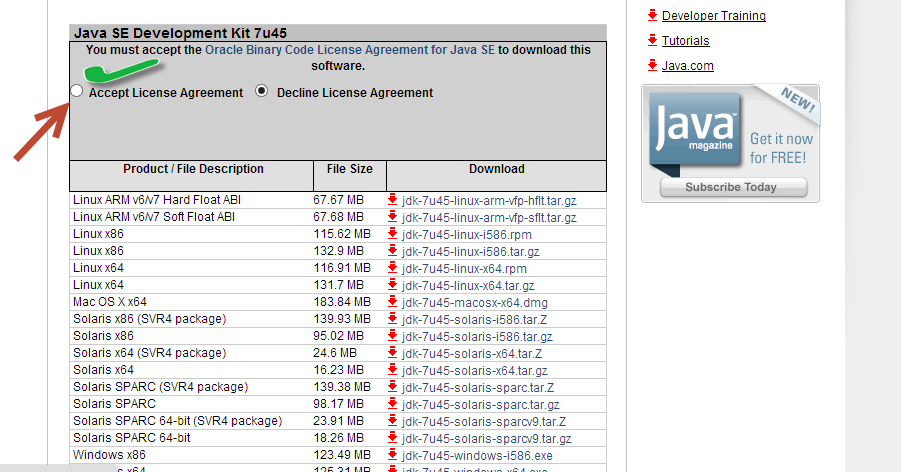
>> Select Download Windows x86 or x64.

>>Run Downloaded File.


Now you have successfully installed JDK But still you have to Set Environment Variable Path to Use java and javac in CMD, you can't run javac except you are in C:\Program Files\Java\jdk1.7.0_45\bin Because you haven't set PATH. So Follow This Link to Set Environment variable Path for JDK.
Wednesday, July 6, 2016
Top 10+ Best C/C++ Compilers/ IDE
.jpg)
Top 10+ Best C/C++ Compilers/ IDE
Programming language has play vital role in the building and progress of computing technology.There are many programming languages like java,c etc but a few of them not all are at top.C and C++ are the base of all others programming languages. Efficiency of programming language depends upon compiler and IDE which you are using.Efficient and quick compile and IDE make your programming skills better.IT,computer science and programmers find hard to search a compile and IDE. ALL YOU NEED has searched out top IDE for your easiness with downloading links.Below are top 15 list of c/c++ compile and IDE for building and learning effective codes in c/c++.Downloading links of each compiler is also given below.
1) Eclipse:

Download Link
Java Run time environment is necessary to compile your C/C++ Programs on your computer. You can download JRE from the following download Link.
Download Link
2) NetBeans:

Download Link
3)Code::Blocks:
.jpg)
Download Link
4) Digital Mars:
.jpg)
Digital mars is best c/c++ compiler with command line and GUI versions.The features which make it distinguish with others compilers it its fast and quick performance to detect errors in code and quick ability to debug them.
Download Link
5) C Free:
.jpg)
Best alternative for traditional turbo c compiler is C Free.It has many new features.New thing is that C FREE is not free.It has trial version for 30 days after that you have to buy.
Download Link
6) Sky IDE:
.jpg)
Download Link
7) Dev C++ :
.jpg)
Download Link
8) Code Lite:
.jpg)
Download Link
9)MinGW:
.jpg)
Download Link
10) Ultimate++ :
.jpg)
Download Link
11) BloodShed Dev-C++

Blood shed Dev-C++ is a IDE for C/C++ programming languages. It works with Mingw port of GCC . Dev-C++ can also be used in combination with Cygwin or any other GCC based compiler.It is fully features compiler.
12) Microsoft Visual Studio Express:
.jpg)
Among best IDE Microsoft Visual Studio Express is at top.It is mostly used IDE. It has compatibility with window Xp service pack 3,window 7,window vista and window 8.
13) Borland C++
.jpg)
Borland C++ is a IDE for C and C++ programming languages.It support r MS-DOS and Microsoft Windows. It has better debugger than turbo c.It is more better than turbo c in its performance and features.
14) Turbo C
.jpg)
Turbo C/C++ is the oldest and ancient IDE for C and C++ programming.It was developed by Borlanb in 2008.Now it has come with new C++ builder which is known as rapid application development (RAD).
-->
Subscribe to:
Posts (Atom)