Showing posts with label VB NET. Show all posts
Showing posts with label VB NET. Show all posts
Wednesday, June 29, 2016
How To Use DataGridView

Hello everyone, now i wanna tell you how to use DataGridView tools on VB.NET
Here are the steps :
1. create your database using Microsoft Access
2. save the database in your_project_name\your_project_name\bin\Debug
3. open your VB.NET project
4. drag the DataGridView tools to the form
5. click on the arrow, and DataGridView tasks would be show.
click choose data source, then click Add project data source..
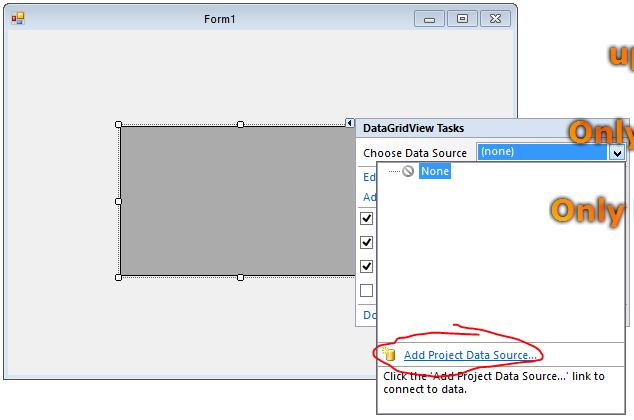
6. choose database > next

7. click on new connection

8. browse the database, and choose the database file that you've saved in \Debug > ok

9. click on no if there's showing an information pop up
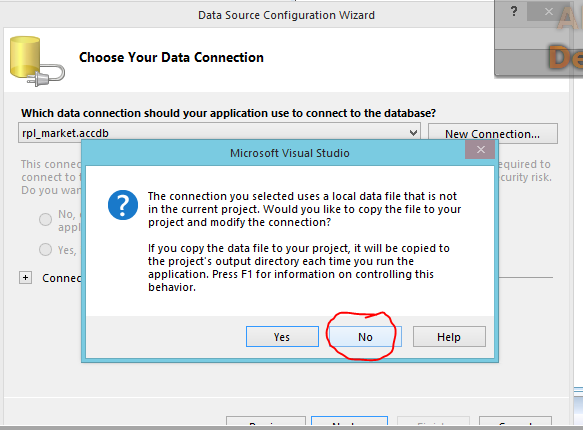
10. checklist "yes, save the connection...", next

11. checklist "Tables", or just checklist some column that you wanna show. finish

12. run your program

that's all the steps, hope you like it.

Monday, June 27, 2016
Solving The Microsoft.ACE.OLEDB.12.0 provider is not registered on the local machine
Hello guys, have you ever seen
or heard this error before ?
okay, maybe you would get this
error when you use the latest
of microsoft access (2010/2013)
and you try to make a database
connection from it to VB.Net. 2008
So, how to solve it ? same as I did,
first, you can try to change the target CPU. how ?
right click on your project name --> properties --> click compile tab --> advanced compile options --> change the target CPU to x86.
But if it doesn't work, you have to do this :
if you use Ms. Access 2010, you have to uninstall it then install Ms. Access 2007 or Ms. Access 2013.
second, if you choose to install Ms. Access 2007, your problem would be solved.
But, if you want to install Ms. Access 2013 then ,you have to install AccessDatabaseEngine 2007 too.
here is the link download AccessDatabaseEngine2007.
Trust me it works.
Read more »
or heard this error before ?
okay, maybe you would get this
error when you use the latest
of microsoft access (2010/2013)
and you try to make a database
connection from it to VB.Net. 2008
So, how to solve it ? same as I did,
first, you can try to change the target CPU. how ?
right click on your project name --> properties --> click compile tab --> advanced compile options --> change the target CPU to x86.
But if it doesn't work, you have to do this :
if you use Ms. Access 2010, you have to uninstall it then install Ms. Access 2007 or Ms. Access 2013.
second, if you choose to install Ms. Access 2007, your problem would be solved.
But, if you want to install Ms. Access 2013 then ,you have to install AccessDatabaseEngine 2007 too.
here is the link download AccessDatabaseEngine2007.
Trust me it works.
Subscribe to:
Posts (Atom)