Showing posts with label Tutorial. Show all posts
Showing posts with label Tutorial. Show all posts
Wednesday, June 29, 2016
How To Use DataGridView

Hello everyone, now i wanna tell you how to use DataGridView tools on VB.NET
Here are the steps :
1. create your database using Microsoft Access
2. save the database in your_project_name\your_project_name\bin\Debug
3. open your VB.NET project
4. drag the DataGridView tools to the form
5. click on the arrow, and DataGridView tasks would be show.
click choose data source, then click Add project data source..
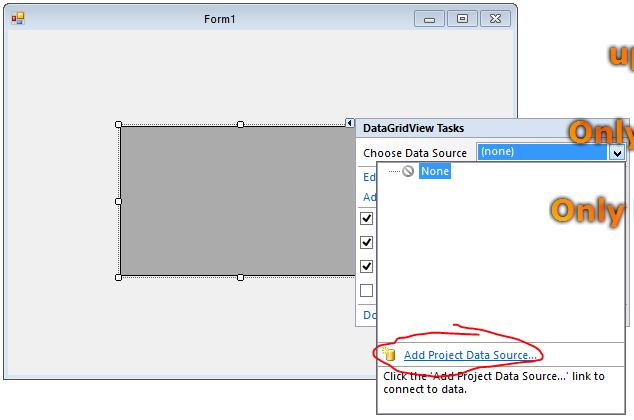
6. choose database > next

7. click on new connection

8. browse the database, and choose the database file that you've saved in \Debug > ok

9. click on no if there's showing an information pop up
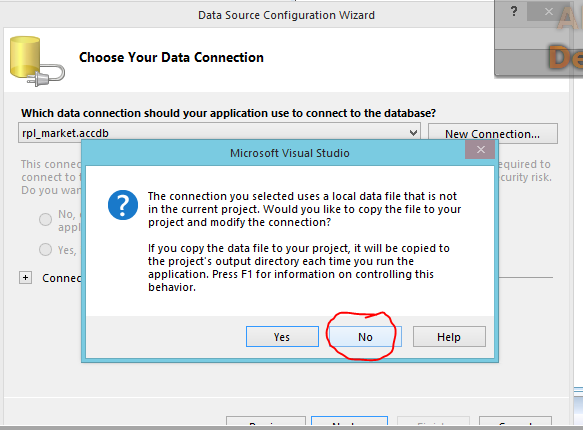
10. checklist "yes, save the connection...", next

11. checklist "Tables", or just checklist some column that you wanna show. finish

12. run your program

that's all the steps, hope you like it.

Monday, June 27, 2016
Solving The Microsoft.ACE.OLEDB.12.0 provider is not registered on the local machine
Hello guys, have you ever seen
or heard this error before ?
okay, maybe you would get this
error when you use the latest
of microsoft access (2010/2013)
and you try to make a database
connection from it to VB.Net. 2008
So, how to solve it ? same as I did,
first, you can try to change the target CPU. how ?
right click on your project name --> properties --> click compile tab --> advanced compile options --> change the target CPU to x86.
But if it doesn't work, you have to do this :
if you use Ms. Access 2010, you have to uninstall it then install Ms. Access 2007 or Ms. Access 2013.
second, if you choose to install Ms. Access 2007, your problem would be solved.
But, if you want to install Ms. Access 2013 then ,you have to install AccessDatabaseEngine 2007 too.
here is the link download AccessDatabaseEngine2007.
Trust me it works.
Read more »
or heard this error before ?
okay, maybe you would get this
error when you use the latest
of microsoft access (2010/2013)
and you try to make a database
connection from it to VB.Net. 2008
So, how to solve it ? same as I did,
first, you can try to change the target CPU. how ?
right click on your project name --> properties --> click compile tab --> advanced compile options --> change the target CPU to x86.
But if it doesn't work, you have to do this :
if you use Ms. Access 2010, you have to uninstall it then install Ms. Access 2007 or Ms. Access 2013.
second, if you choose to install Ms. Access 2007, your problem would be solved.
But, if you want to install Ms. Access 2013 then ,you have to install AccessDatabaseEngine 2007 too.
here is the link download AccessDatabaseEngine2007.
Trust me it works.
Saturday, June 25, 2016
How to Make a simple calculator using c++
goodnight viewers, now i won't speak about android. but i'll share to you
How to Make a simple your own calculator using c++ language programming. let's begin.
first, you have to install IDE and compiler of c++. such as Dev c++. wait until it finished.
second, run dev c++third, type the code seems like this. then, compile the program (f11).
finished.

Wednesday, June 22, 2016
How to backup EFS file on Samsung Galaxy Note 2 GT-N7100 [VIDEO]
 |
| Samsung GT-N7100 EFS Backup [VIDEO] |
Pre-requisites :
- Enable Usb debugging
- Rooted phone
- Adb folder
Video How to backup EFS file on Samsung Galaxy Note 2 GT-N7100
How to backup EFS file on Samsung Galaxy Note 2 GT-N7100 [VIDEO]
Tuesday, June 21, 2016
How to Install Custom ROM via CWM Recovery

i would like to inform to you about how to install custom ROM on your
Android devices.
1. First, you have to root your android phone, then
2. Install ClockWorkMod Recovery
3. Download the custom ROM that compatible for your android phone,
you can download here www.cyanogenmod.org, or anywhere else.
4. After that, insert your SDcard into your PC (you can use card reader)
5. then, copy the compressed Custom ROM files that you've downloaded into your SDcard
6. Insert your SDcard into your android phone(you have to turn it off before)
7. Go into recovery mode, then you choose "install zip from SDcard"
8. choose the compressed Custom ROM files
9. Just wait until it finished.
10. Reboot your phone
11. finished
thank you for your attention, hope you get benefits from this article.
Friday, June 10, 2016
Samsung Galaxy Note 2 GT-N7100 EFS Backup & Restore
|
| Samsung GT-N7100 EFS Backup & Restore |
N7100 EFS Backup & Restore by
Feature :
- Efs Backup
- Efs Restore
- Show Block Partition

Notes..!!!
- Please enable usb debugging and install driver
- Need rooted phone
- This is only for GT-N7100 model
- But maybe working on other samsung phone that have same block partition
Samsung Galaxy Note 2 GT-N7100 EFS Backup & Restore
how to make factorial program using C++
hello viewers, now i would like to share to you 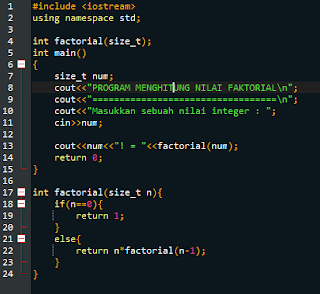
Read more »
how to make a factorial program using C++ language programming.
let's do it.
first, open your C++ IDE, such as Dev c++ or borland.
second, type this code

i hope you get benefits from this article
Subscribe to:
Posts (Atom)